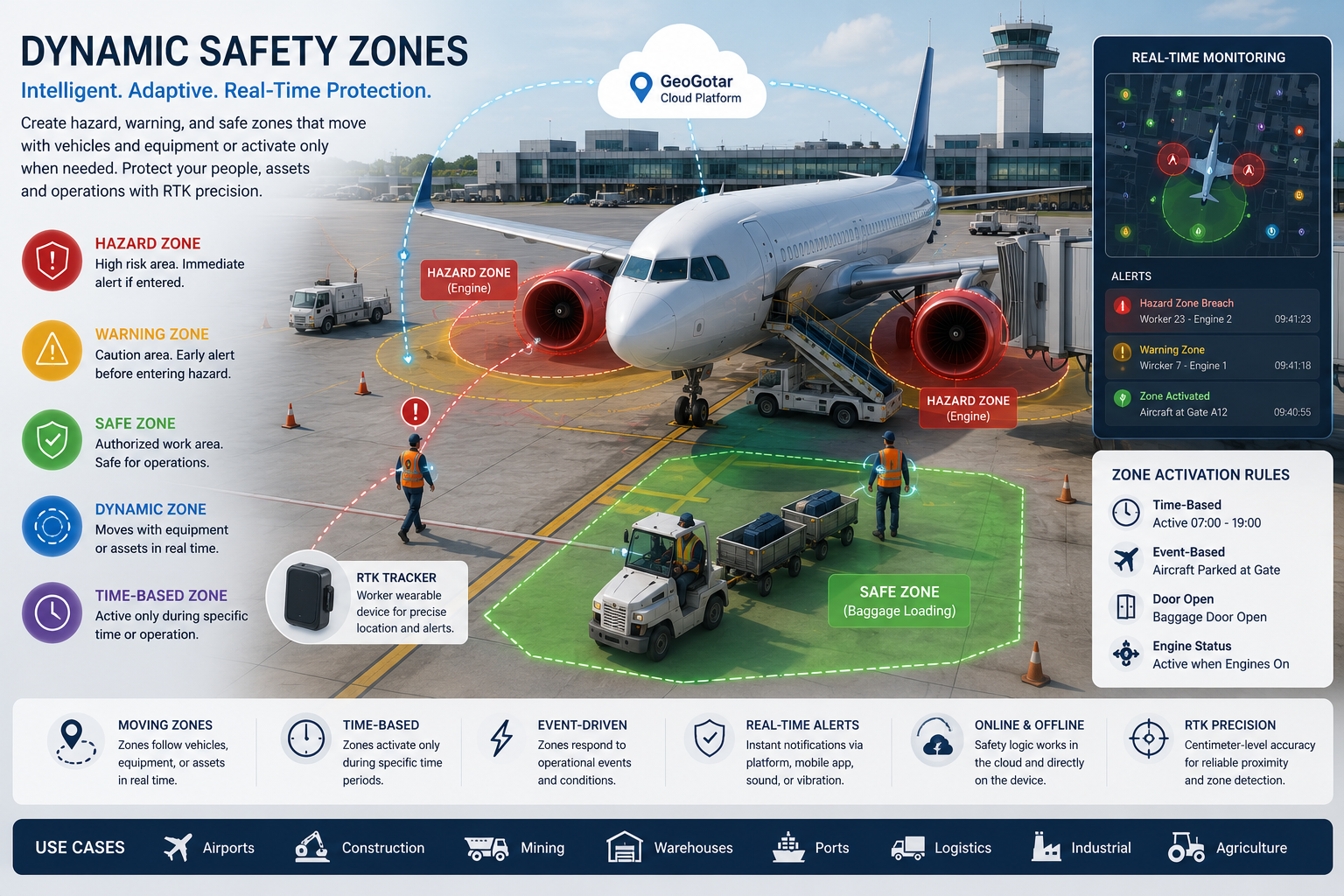
Safety Zones That Adapt to Operations
GeoGotar allows organizations to create intelligent virtual zones that respond to operational conditions instead of remaining permanently fixed on a map. A zone can follow moving equipment, activate only during certain activities, or disappear automatically when work is complete.
This creates a more realistic safety model, reduces unnecessary alerts, and helps workers understand which areas are currently restricted, which require caution, and which are approved for normal operations.
Hazard, Warning, and Safe Zones
Different operational situations require different levels of protection. GeoGotar supports multiple zone types that can be used independently or together.
Hazard Zones
Hazard Zones represent the highest-priority restricted areas. Entering one can immediately trigger local tracker alerts, cloud notifications, event logging, or escalation workflows.
- Aircraft engine exclusion areas.
- Excavator swing radius.
- Crane lifting or rotation areas.
- Mining vehicle blind spots.
- Industrial robot operating envelopes.
Warning Zones
Warning Zones provide an early notification before a worker reaches a Hazard Zone. The tracker can generate vibration, sound, or visual feedback so the worker has time to stop or change direction.
Safe Zones
Safe Zones identify approved work areas, access corridors, loading locations, maintenance positions, pedestrian paths, or assembly points where personnel are expected to operate.
Dynamic Zones That Move With Equipment
Unlike traditional map-based geofences, a GeoGotar safety zone can be attached directly to a tracked asset. As that asset changes position, the virtual perimeter moves with it in real time.
- Forklifts and yard vehicles.
- Excavators, loaders, and bulldozers.
- Airport pushback vehicles and service equipment.
- Agricultural tractors and harvesters.
- Autonomous robots and mobile industrial platforms.
- Service vehicles and temporary work equipment.
Because workers and equipment can both carry RTK trackers, GeoGotar can continuously calculate proximity to the moving hazard instead of relying on a fixed boundary.
Time-Based Zone Activation
Some hazards exist only during specific hours or operational windows. GeoGotar can activate and deactivate zones according to a defined schedule.
- Construction work hours.
- Night maintenance operations.
- Temporary road or lane closures.
- Scheduled loading and unloading periods.
- Restricted access during maintenance shifts.
When the configured activity period ends, the zone can automatically become inactive, helping reduce false alarms outside the actual hazard window.
Event-Driven Safety Zones
Zones can also respond to equipment state or operational events instead of only time. This allows protection to match what the equipment is actually doing.
- Activate when a vehicle ignition is turned on.
- Expand when a hydraulic boom is extended.
- Appear when an aircraft arrives at a gate.
- Enable when a crane lifting operation begins.
- Change when a machine enters autonomous mode.
- Deactivate automatically when the operation ends.
Airport Ground Operations Example
When an aircraft parks at a gate, GeoGotar can create temporary Hazard Zones around each engine, Warning Zones around those restricted areas, and Safe Zones near baggage doors and approved access routes.
Each ground worker can carry a GeoGotar RTK tracker. If a worker approaches an active engine zone, the tracker can issue an immediate local alert while the platform records the event for supervisors. When the aircraft leaves the gate, the associated zones can be removed automatically.
Online and Offline Safety Logic
GeoGotar safety rules can be managed centrally through the cloud, but devices can also continue evaluating previously loaded zones when connectivity is interrupted. This allows local alerts to remain available in areas with unreliable network coverage.
When connectivity returns, the tracker can synchronize events, receive updated zone configurations, and continue operating with the latest available rules.
Key Benefits of Dynamic Safety Zones
- Create Hazard, Warning, and Safe Zones.
- Move zones together with vehicles and equipment.
- Activate zones by schedule, event, or operational condition.
- Reduce unnecessary alerts by enabling hazards only when relevant.
- Use RTK positioning for more accurate proximity detection.
- Deliver local worker alerts and cloud notifications.
- Support offline safety logic during network interruptions.
- Manage and update zone behavior remotely.
- Apply one safety framework across multiple industries and sites.